The 3-2-1 Backup Strategy Explained (With a Self-Hosted Setup You Can Copy)
 Towfiq I
You almost certainly have one copy of your important data. Maybe two. The trouble is that the moment that copy lives in one place, one bad event takes it all: a dead drive, a wrong command, a stolen laptop, or ransomware that reaches across your network. The 3-2-1 backup strategy is the simplest rule that has survived decades of changing technology, and it exists for exactly that reason.
This guide explains what 3-2-1 actually means, why it still matters in 2026 (and how it’s quietly evolved), what a real setup looks like, and how to build one yourself in a few minutes with Pluton. No theory you can’t act on.
Key Takeaways
- The 3-2-1 backup strategy means 3 copies of your data, on 2 different types of media, with 1 copy kept off-site.
- It matters more than ever because backups are now the target: 94% of 2025 ransomware attacks tried to compromise them (Sophos, The State of Ransomware 2025, 2025).
- The rule has grown into 3-2-1-1-0, adding one immutable/offline copy and zero recovery errors (a tested restore).
- You don’t need enterprise software to do it. Pluton replicates one backup to multiple storage destinations, so 3-2-1 happens automatically.
What Is the 3-2-1 Backup Strategy?
The 3-2-1 backup strategy is a rule that says you should keep three copies of your data, stored on two different types of media, with at least one copy off-site. It was popularized by photographer Peter Krogh and has become the accepted baseline for data protection because it removes every single point of failure at once.
Break the numbers down and it’s easy to remember:
- 3 copies: your live data plus two backups. One copy is never enough, because the original and a single backup can fail together.
- 2 different media: don’t keep every copy on the same kind of storage. An internal disk plus an external drive, or a NAS plus a cloud bucket. If one medium has a flaw, the other isn’t exposed to it.
- 1 off-site: at least one copy lives somewhere physically separate. A fire, flood, theft, or ransomware hit at your location can’t reach it.
The 3-2-1 rule removes every single point of failure: drive, location, and media type.
The genius of the rule is that it’s storage-agnostic. It worked with tapes in the 1990s and it works with cloud object storage today. According to the data-management firm Veeam, the 3-2-1 rule remains the foundational recommendation precisely because it guarantees survivability against unrelated, simultaneous failures (Veeam, 3-2-1 Backup Rule, 2025). Follow it and there’s no single thing that can wipe out everything you have.
Why Does the 3-2-1 Rule Still Matter in 2026?
The 3-2-1 rule matters more now than when it was written, because attackers have figured out that your backup is the thing standing between them and a paid ransom. In 2025, 94% of organizations hit by ransomware said the attackers tried to compromise their backups during the attack (Sophos, The State of Ransomware 2025, 2025). Backups aren’t an afterthought to the attack. They’re the objective.
Here’s what makes that statistic so dangerous: when those attempts succeed, the damage multiplies. Sophos found that organizations whose backups were compromised faced a recovery bill eight times higher and were almost twice as likely to pay the ransom. Only 54% of victims managed to restore from backups in 2025, a six-year low.
This is where 3-2-1 earns its keep. If one of your copies is off-site and out of the attacker’s reach, you still have a clean version to restore from when the local copies are encrypted. The rule isn’t about paranoia. It’s about making sure no single incident, malicious or accidental, can take everything.
Our finding from the Pluton support inbox: the people who write to us after a scare almost never lost data to something exotic. It’s a failed drive plus a backup they thought was running but wasn’t, or a single cloud copy they couldn’t reach. 3-2-1 is boring on purpose, and boring is what survives.
Has the 3-2-1 Rule Evolved? Meet 3-2-1-1-0
Yes. The modern version of the rule is 3-2-1-1-0, and the two extra digits exist because of ransomware. Backup vendors including Veeam and Datto now recommend it as the updated baseline, adding one immutable or air-gapped copy and a verified, error-free restore on top of the classic three numbers (Datto, The 3-2-1-1-0 Backup Rule, 2025).
The two new components address the exact weakness attackers exploit:
- 1 immutable or offline copy. “Immutable” means it can’t be altered or deleted for a set period, even by an administrator account. This is what stops ransomware (or a careless
rm) from reaching back and corrupting your safety net. Object storage with Object Lock, like Backblaze B2 or any S3-compatible bucket with WORM enabled, is the common way to do it. - 0 errors. Every backup should be verified and test-restored so you know it actually works. A backup you’ve never restored is a guess, not a guarantee.
That final zero is the one almost everyone skips, and it’s the most important. Industry audits show only 61% of restore attempts actually succeed, meaning four in ten fail at the worst possible moment (CrashPlan, 75+ Data Loss Statistics for 2026, 2026). You don’t have a backup until you’ve watched it come back.
What Does a Real 3-2-1 Setup Look Like?
A real 3-2-1 setup maps each of the three numbers to a specific, concrete place your data lives. The strategy only fails when it stays abstract. So here’s a copyable example for a typical homelab or small business, where the live data sits on a NAS or server.
| Copy | Where it lives | Media type | Off-site? | Role |
|---|---|---|---|---|
| Copy 1 (live) | Your NAS / server / workstation | Internal disk | No | The data you use every day |
| Copy 2 (local backup) | An external drive or second NAS | Different disk | No | Fast restores for everyday mistakes |
| Copy 3 (off-site) | A cloud bucket (Backblaze B2, S3, Storj) | Object storage | Yes | Survives fire, theft, and ransomware |
That’s three copies, two distinct media types (internal disk and an external drive, plus object storage), and one off-site copy in the cloud. Make the cloud copy immutable with Object Lock and run a test restore now and then, and you’ve quietly upgraded to 3-2-1-1-0.
Notice what this doesn’t require: no enterprise license, no second data center, no consultant. A homelabber can do it with a USB drive and a $6/month storage bucket. A small business can do the same thing at a slightly larger scale. The rule scales down as gracefully as it scales up.
According to Pluton’s own positioning, the 3-2-1 strategy becomes simple when one tool mirrors a single backup to several destinations at once, so you’re not hand-juggling separate jobs for the local and off-site copies. That’s exactly what the next section walks through.
How to Set Up a 3-2-1 Backup Plan With Pluton
Pluton turns 3-2-1 into a single backup plan by letting you pick your folders once, send them to a primary storage, and replicate the same backup to additional destinations automatically. It’s open-source, self-hosted, and built on the proven restic and rclone engines, so your data is encrypted on your device before it leaves and you stay in control of every copy. Here’s the whole flow.
1. Download & Install Pluton
Pluton is open source and can be deployed with docker or can be installed directly on your machine. You can download the installer from the Downloads page.
2. Connect Your Storage Destinations
On the Storages page, add the destinations that will hold your copies. For a real 3-2-1, connect at least two: a local one (an external drive, an SFTP box, or a second NAS) and an off-site cloud target from the 70+ supported options, such as Backblaze B2, Amazon S3, or Storj. Each destination you add becomes a place a copy can land.
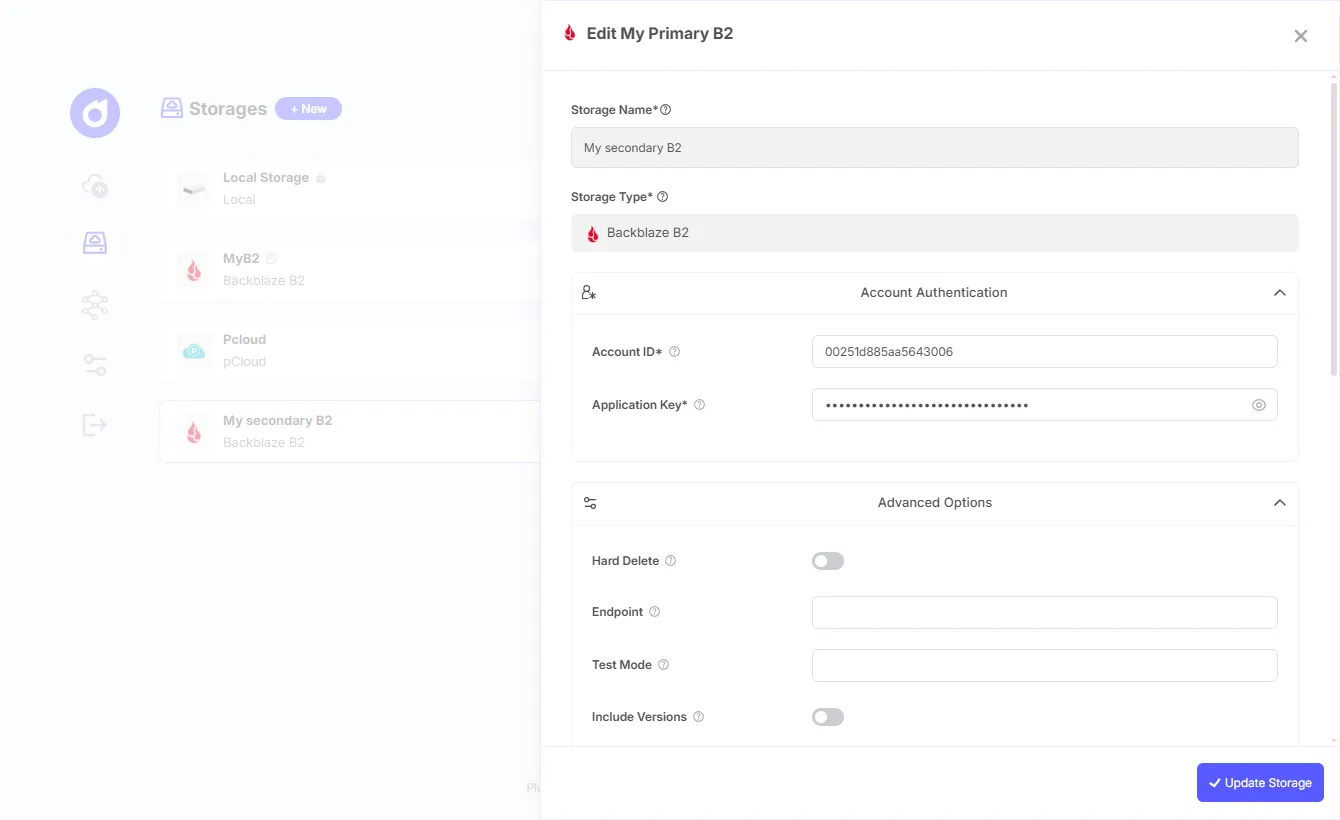
Connecting a storage destination on Pluton’s Storages page.
3. Create a Backup Plan and Pick Your Source
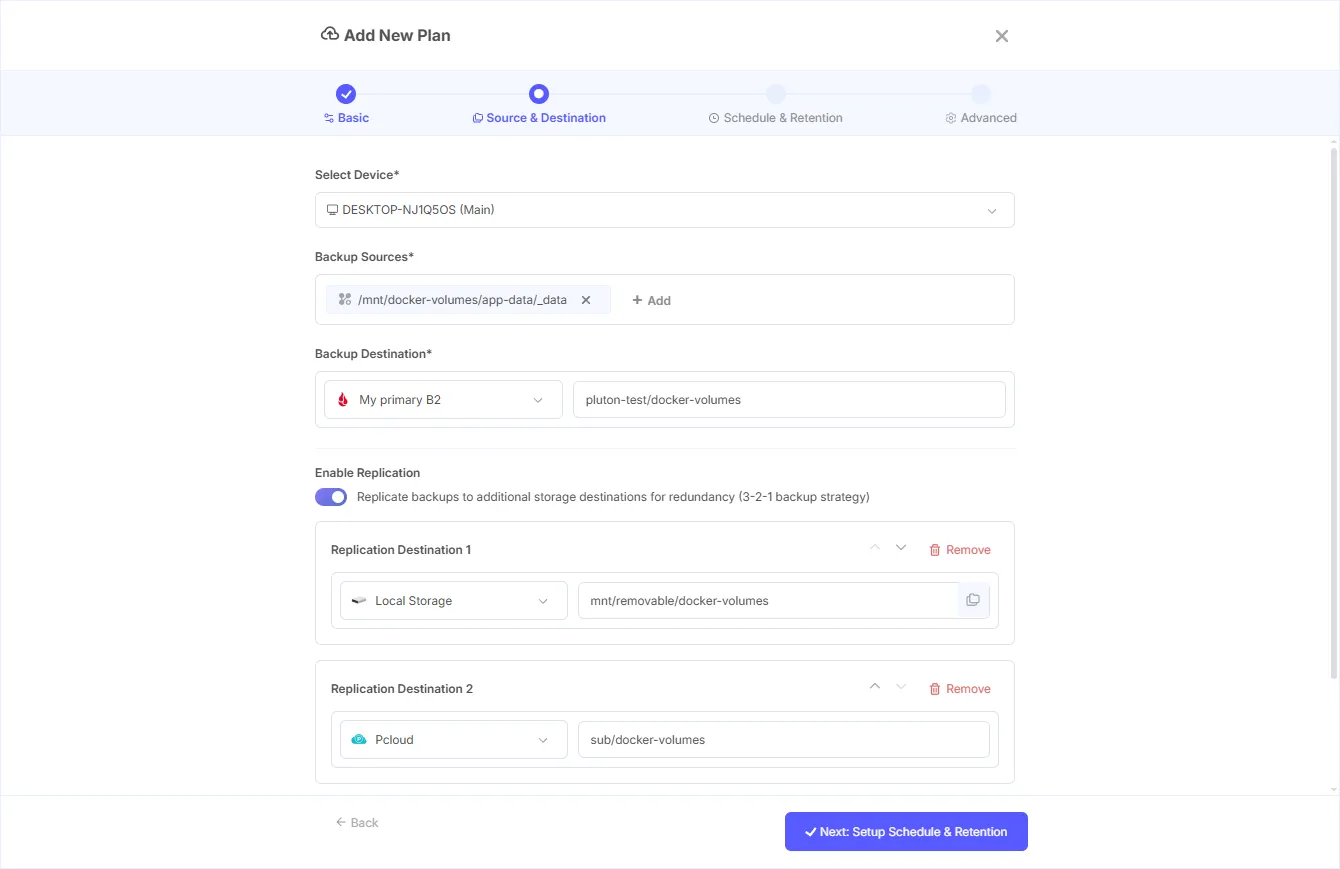
Click + New to open the Add Plan panel, give the plan a clear name like “Documents Daily 3-2-1,” and choose Periodic Backup. On the next step, select the device and the folders you want protected. This defines the data behind all three copies.
4. Choose Your Primary Destination
Still in the source-and-destination step, click Select Storage and pick where the primary backup goes. For most homelabs this is the local copy: your external drive or second NAS. This is copy number two in the 3-2-1 model (your live data being copy one).
5. Turn On Replication for the Off-Site Copy
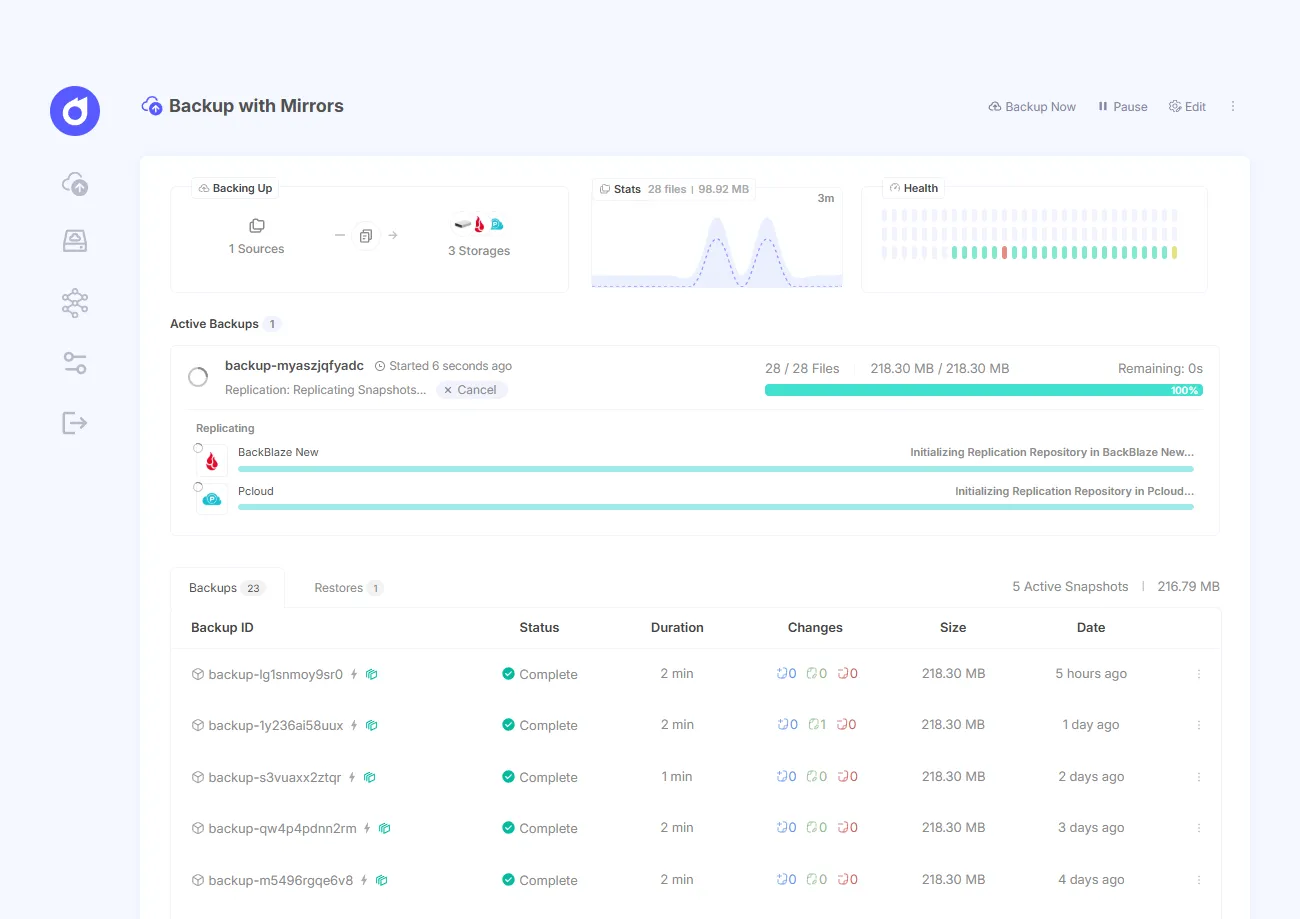
This is the step that creates true 3-2-1. Toggle Enable Replication on, click + Add Replication Destination, and select your off-site cloud storage. After every backup finishes on the primary, Pluton mirrors the same data to this destination automatically. You can add up to two replication destinations on the free edition (five on PRO), and enable Run replications concurrently to mirror in parallel.
Why this matters: each mirror keeps its own independent copy, and you can browse, compare, and restore from any of them. That off-site mirror is the copy that survives the disaster that takes out your house or your network.
6. Set a Schedule and Encrypt
Pick a schedule (a daily run at 2 a.m. is sane for most people) and choose how many snapshots to keep. In the Advanced Settings step, turn on Encryption and Compression. With encryption on, your data is sealed with AES-256 on your own device before it’s uploaded, so plaintext never touches the network or your cloud provider.
7. Create the Plan and Run the First Backup
Click Create Plan. Pluton initializes the restic repository, sets the schedule, and kicks off the first backup immediately. When it finishes, the data is replicated off-site on its own. From here, the multi-channel notifications (email, Slack, Discord, NTFY) tell you the moment a job fails, so a silently broken backup can’t blindside you months later.
For a step-by-step companion on the underlying engine, read our best restic GUI tools in 2026 comparison of self-hosted restic interfaces.
What Are the Most Common 3-2-1 Mistakes?
The most common 3-2-1 mistakes all come from following the letter of the rule while missing its intent. People hit “3 copies” on paper and still lose everything. Avoid these four, and you’re ahead of most setups.
- All copies in one place. Three copies on the same NAS is one copy with extra steps. One fire, theft, or ransomware hit takes all of them. The off-site copy is non-negotiable.
- Same media, different folders. Two backups on two partitions of the same physical disk isn’t “two media.” When that disk dies, both die.
- Never testing the restore. This is the big one. With only 61% of restores succeeding industry-wide, an untested backup is a coin flip (CrashPlan, 75+ Data Loss Statistics for 2026, 2026). Restore to a scratch location every so often and confirm the data opens.
- No alert when it breaks. A backup that stopped running three months ago is the classic self-hosting horror story. If your tool can’t tell you it failed, you’ll find out at the worst possible time.
Get a Real 3-2-1 Backup Running in Under 5 Minutes
You now know what 3-2-1 means, why ransomware makes it essential, and how the modern 3-2-1-1-0 version closes the last gap. The only step left is doing it. If you want scheduled, encrypted backups with an automatic off-site copy and an alert the moment something fails, Pluton’s free open-source edition does all of it without a line of restic.
It’s lightweight enough to run on a Raspberry Pi at around 50 MB of RAM, connects to 70+ storage destinations, and the replication feature builds your 3-2-1 for you. No credit card, no Pluton cloud, no lock-in.
Get the free, open-source edition of Pluton → and set up your first 3-2-1 plan today.
Frequently Asked Questions
What does 3-2-1 backup actually mean?
The 3-2-1 backup strategy means keeping three copies of your data, on two different types of storage media, with at least one copy stored off-site. It removes every single point of failure at once, which is why it’s been the accepted data-protection baseline for decades and still holds up in 2026.
Is the 3-2-1 backup rule still relevant in 2026?
More than ever. Backups have become the primary target of ransomware: 94% of 2025 attacks tried to compromise them, and a compromised backup raised recovery costs eightfold (Sophos, The State of Ransomware 2025, 2025). The off-site, out-of-reach copy in 3-2-1 is exactly what survives that.
What is the difference between 3-2-1 and 3-2-1-1-0?
3-2-1-1-0 extends the classic rule by adding two things: one immutable or air-gapped copy that can’t be altered or deleted, and zero recovery errors, meaning every backup is verified with a test restore (Datto, 2025). The extra digits exist to defend against ransomware and untested backups.
Can I do 3-2-1 backup for free?
Yes. The open-source edition of Pluton is free forever and includes multi-storage replication, which creates the off-site copy automatically. Pair a local drive with a low-cost cloud bucket like Backblaze B2, and a full 3-2-1 setup costs only the storage itself, often just a few dollars a month.
How many copies does 3-2-1 require?
Three. That’s your live, working data plus two separate backups. The reason for three rather than two is redundancy against simultaneous failure: an original and a single backup can fail together, but a third copy, especially an off-site one, gives you a clean recovery point when the others are gone.
Final Thoughts
The 3-2-1 backup strategy has outlasted tapes, optical discs, and a dozen “revolutionary” backup products because it solves the only problem that actually matters: making sure no single event can erase your data. Three copies, two media, one off-site. The 3-2-1-1-0 update just adds the two things ransomware taught us to care about: a copy nothing can touch, and a restore you’ve actually tested.
Don’t let it stay theory. Connect a local drive and a cloud bucket, create one plan with replication turned on, and run a test restore once it’s done. Once you’ve watched your data come back from an off-site copy, you’ll never run a server without it.
Ready to apply 3-2-1 to a specific app? Start with our how to back up Docker volumes guide to protecting self-hosted container data.
Sources
- Sophos, The State of Ransomware 2025, retrieved 2026-06-10, https://www.sophos.com/en-us/content/state-of-ransomware
- CrashPlan, 75+ Data Loss Statistics for 2026: The Complete Guide, retrieved 2026-06-10, https://www.crashplan.com/blog/75-data-loss-statistics-for-2026-the-complete-guide/
- Veeam, 3-2-1 Backup Rule Explained, retrieved 2026-06-10, https://www.veeam.com/blog/321-backup-rule.html
- Datto, What is the 3-2-1-1-0 Backup Rule?, retrieved 2026-06-10, https://www.datto.com/blog/3-2-1-1-0-backup-rule/
- Pluton, Official Website, retrieved 2026-06-10, https://usepluton.com
- Pluton, GitHub Repository, retrieved 2026-06-10, https://github.com/plutonhq/pluton